
INDOOR LED
Indoor LED screens planned around viewing distance, resolution and space
Choosing an indoor LED display starts with the viewing distance, available dimensions, content, ambient light, mounting conditions and service access. A single headline specification cannot establish whether a screen will suit the space.

An indoor direct-view LED screen uses modules to form a display surface. Its physical size, pixel pitch and total pixel matrix need to work together with the material people will watch or read.
Spectracolor reviews these requirements alongside control equipment and installation conditions before the final specification is developed. The broader digital signage plan defines communication objectives and operational responsibilities; this page focuses on selecting and planning the indoor LED display itself.
Start with viewing distance
Identify the closest expected viewer and the positions from which most people will normally see the display. A reception wall viewed from a few steps away presents different requirements from a screen across an auditorium or public interior.
Viewing distance affects how readily individual pixels can be distinguished. It also influences the size of text, diagrams and other detail needed for the content to remain useful.
Review typical content from representative positions rather than selecting pitch from distance alone. In arrival areas, digital lobby signage also needs to account for where visitors pause, how they move and what information belongs at reception.
Choose pixel pitch around the application
Pixel pitch describes the spacing between adjacent pixel centers. A smaller pitch places more pixels within the same physical area and can support closer viewing or finer detail.
The smallest available pitch is not automatically the right choice. Content detail, screen dimensions, viewing positions, budget and the selected equipment all need to be considered together.
A screen showing large promotional images may have different requirements from one carrying small text or detailed graphics. The specification should follow the actual application, with sample content reviewed where practical.
Separate screen size from native resolution
Physical screen dimensions describe the width and height of the display surface. Native resolution describes its total number of pixels across and down.
That pixel matrix depends on pixel pitch, module or cabinet configuration and the final dimensions. A larger physical screen does not, by itself, establish a particular native resolution.
HD or 4K should therefore describe a verified configuration or source format, rather than every indoor LED screen. A high-resolution source can still require scaling to fit a different native pixel matrix.
Plan content format, aspect ratio and scaling
Consider the intended content before fixing the display dimensions. Landscape, portrait, ultra-wide and custom surfaces may need different layouts and content preparation.
Decide whether a source should fill the screen, preserve its original proportions or occupy a defined area. Those choices can introduce scaling, borders or cropping that should be understood before installation.
Pixel-for-pixel presentation requires the content dimensions and processing configuration to match the native display matrix. Content production and adaptation should be separately assigned rather than assumed to accompany the hardware.
Consider brightness, ambient light and reflections
Indoor lighting varies between controlled meeting spaces, retail interiors, glazed lobbies and bright atriums. Daylight and nearby reflective surfaces can change the viewing conditions throughout the day.
Select brightness around readability, image appearance and viewer comfort. More brightness is not automatically better, particularly where people sit close to the display or surrounding lighting is subdued.
Review daylight, glare and the proposed screen position together. Locations with exterior or semi-exposed conditions should first be assessed using the distinction between indoor and outdoor LED screens.
Compare direct-view LED and LCD display formats
Direct-view LED can form large modular display surfaces. It avoids the panel bezel grid associated with tiled LCD video walls, while still requiring careful module alignment and calibration.
Commercial LCD may be appropriate where standard screen dimensions, close viewing and a smaller display area fit the application. Tiled LCD systems can also provide larger surfaces, with the panel boundaries considered as part of the layout.
Neither format is universally better. Compare the available display products around content, dimensions, viewing conditions, mounting and access rather than assuming every indoor application requires LED.
VISUAL REFERENCES
Real display environments
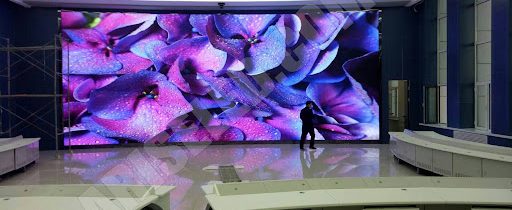
Check alignment, calibration and image consistency
An LED wall is assembled from modules and cabinets. Their physical alignment and the condition of the supporting installation affect how the completed surface appears.
Calibration and commissioning also influence consistency across the display. A continuous image should not be treated as an automatic result of using modular LED equipment.
Review the finished display with representative content, including material that makes differences in brightness or color easier to identify. Agree the commissioning and acceptance requirements within the project scope.
Plan controllers, inputs and signal paths
Define the sources that will feed the display and the inputs the selected control equipment must accept. Source resolution, signal format, cable routes and equipment locations need to be coordinated with the intended screen configuration.
Controllers and signal-distribution equipment should remain accessible after installation. Where several sources are required, switching and processing responsibilities should be established before the equipment is selected.
Display control does not automatically include a CMS, content scheduling, cloud services, analytics, network infrastructure or data integrations. Software applications, content production and third-party systems remain separate requirements unless specifically included. Control-room use does not imply that monitoring software or command-and-control applications are supplied.
Coordinate mounting and structural interfaces
Indoor LED displays may be wall-mounted, recessed, suspended, freestanding or supported by a custom structure. The installation approach must suit the selected equipment and the surrounding construction.
Supporting surfaces, fixings, tolerances, cable paths and service spaces should be reviewed before finalizing the display position. Existing walls and decorative finishes should not be assumed to provide suitable support without assessment.
An engineered display solution can help define the display-related mounting, structural interfaces, power, cabling and access provisions within the agreed project scope. Responsibilities for the building structure and other trades should be identified separately.
Plan ventilation and heat management
Indoor LED equipment generates heat. The ventilation arrangement depends on the selected product, operating conditions, equipment locations and the surrounding space.
Recessed walls, joinery and enclosed installations require particular attention to airflow and access. A visually tidy enclosure can still create problems if it restricts the ventilation required by the equipment.
Coordinate thermal requirements with the enclosure and building services before finishes are closed. Follow the requirements of the selected equipment rather than assuming all indoor LED systems have the same heat or cooling needs.
Decide how the display will be serviced
Front and rear service arrangements vary by product and installation. Front access should be confirmed for the selected configuration rather than presented as a universal indoor LED feature.
Modules, power supplies, controllers and signal connections may have different access requirements. Confirm the working space, tools and access routes needed to reach them.
Serviceability should be reviewed before surrounding walls, joinery or structural finishes are completed. An installation that fits the available opening must also allow the required maintenance work.
Consider installation in finished or occupied spaces
Plan the route for cabinets, frames and other equipment from delivery to the final position. Doorways, lifts, circulation areas and temporary storage can constrain the installation sequence.
In an occupied building, agree working hours, protection of finishes and separation of the work area with the operator and contractor. Installation planning should account for other trades and the activities that need to continue nearby.
Equipment movement, mounting, cabling, commissioning and final handover should be sequenced around the actual site conditions rather than assuming an unobstructed space.
Plan for operating hours and maintenance
State the intended operating schedule before final specification. Extended daily use can affect equipment selection, ventilation review and the practical arrangements for servicing the display.
Define who will carry out routine checks and maintenance, how faults will be reported and when equipment can be accessed. Spare-module requirements and replacement procedures should be discussed for the selected system.
Warranty coverage, exclusions, spare-parts availability and service response terms are product- and project-specific. A pixel warranty should not be treated as equivalent to a complete-system warranty, and ongoing support should follow the agreed service scope.
Consider camera and filming requirements where relevant
If the display will be filmed during presentations, events or broadcasts, include that requirement in the brief. A screen that looks acceptable to viewers in the room may behave differently on camera.
Refresh behavior, processing and the relationship between the selected display equipment and camera settings can affect the recorded image. Camera-facing suitability should therefore be checked for the proposed configuration.
Where filming is important, representative camera testing should be considered as part of the project’s acceptance planning. Broadcast suitability and compatibility with every camera setup should not be promised as general indoor LED capabilities.
Prepare the right information before specification
A useful indoor LED assessment should include:
- available width and height
- closest and typical viewing distances
- intended audience
- type of content
- preferred aspect ratio
- source-content resolution
- ambient-light conditions
- wall or structure information
- mounting method
- power availability
- signal and input requirements
- controller and equipment locations
- ventilation conditions
- front or rear service access
- operating hours
- installation constraints
- camera use, where relevant
- service, spare-parts and warranty requirements
These details help establish the physical display format, pixel matrix, control requirements and installation provisions before the final equipment specification is agreed.
NEXT STEP
Discuss your indoor LED requirements
Share the viewing distance, available dimensions, intended content and site conditions. Spectracolor can review pixel pitch, native resolution, mounting, signal requirements, ventilation and service access with you before the indoor LED specification is finalized.
Talk to Spectracolor →