
BUILDING DIRECTORIES
Digital building directories for tenant, floor and destination information
Digital building directories provide a dedicated place to present tenant, department, floor, service and destination information at entrances, reception areas and other decision points within a building.
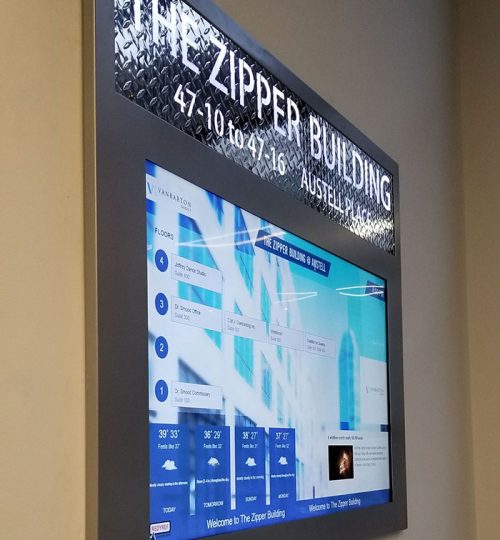
The display format is only one part of the system. Placement, viewing distance, text size, content density, update responsibility, mounting conditions and access to power or data all influence how useful the directory can be in practice.
A directory should therefore be planned around the information people need to see and the physical space in which they encounter it.
Define the directory information first
Different buildings need different directory structures.
An office tower may need tenant names and floor numbers. A hospital may need departments and public services. A university can require buildings, faculties or facilities. A mixed-use property may need a combination of destinations, tenants and shared amenities.
The content structure should be defined before screen dimensions or orientation are finalized.
Long tenant lists, multiple buildings or frequently changing information can require a very different layout from a short fixed directory.
The goal is to make the information hierarchy clear without trying to place every available detail on one screen.
Place directories at useful decision points
Directory placement should follow the way people enter and move through the building.
Typical positions include main entrances, reception areas, lift lobbies and locations where visitors need to decide which direction to take next.
A directory positioned too far from the natural circulation path may be easy to miss. One placed where people stop can require a different mounting height and screen size from a display designed primarily for passing viewers.
Digital lobby signage may also be used in the same arrival environment for welcome messages, announcements or branding, while the directory retains a more specific information role.
The two functions can share a space without needing to perform the same job.
Choose portrait or landscape around the content
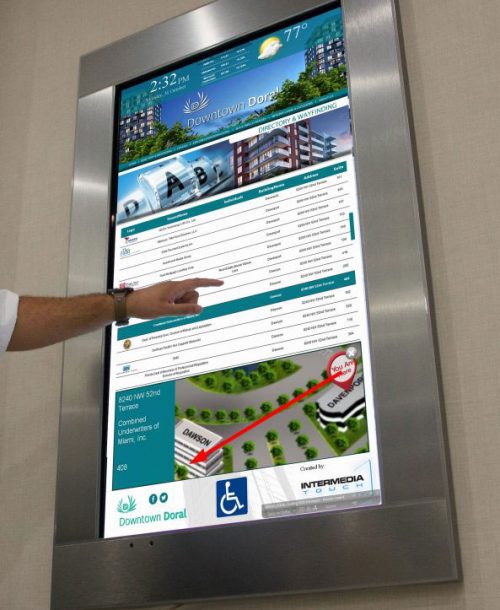
Portrait directories often suit long vertical lists and narrow wall positions, while landscape formats can provide more horizontal space for grouped information, maps or multiple information columns.
Neither orientation is automatically better.
The appropriate format depends on the available wall or floor area, the quantity of information and the way the content needs to be organized.
Screen size should also be considered together with viewing distance rather than selected independently from it.
Plan for text-heavy content and readability
Directory information is often text-heavy, so readability should be treated as a primary design requirement.
Type size, contrast, line spacing, line length and the number of entries shown at once all affect how comfortably the information can be read.
Ambient light and reflections should also be considered, particularly near glazed entrances or brightly lit public spaces.
Trying to fit too many listings onto one screen can reduce clarity. Where the content set is large, it may be more appropriate to divide information across several views or use a different directory format.
This is part of the wider digital signage planning process rather than simply a screen-resolution decision.
VISUAL REFERENCES
Real display environments
Separate the display from source systems
The screen presents directory information, but it should not automatically be treated as the database or business system behind that information.
Tenant records, department lists, room data, live occupancy information, mapping data and other source information may come from separate platforms.
If a project requires live synchronization, automated updates or data from third-party systems, those integrations should be defined separately.
The same applies to CMS platforms, visitor-management systems, booking tools, access-control platforms and network infrastructure.
The directory display can be planned around those requirements once the relevant systems and responsibilities are known.
Assign responsibility for directory updates
A directory is only as current as the information supplied to it.
For that reason, it is useful to define who is responsible for adding, removing and approving tenant, department or destination information.
In a single building, one facilities or property team may manage those changes.
Across several locations, the organization may need a common visual standard while allowing local information to vary by building.
The update process should be agreed as an operational responsibility rather than assumed to be automatic because the directory is digital.
Use interaction only where it is required
Many building directories only need to present information.
Touch, search, route selection or user interaction should not be added unless the project actually requires them.
Where visitors need to search listings, select destinations or interact with an application, digital kiosks may provide a more appropriate hardware format.
Those interactive functions can also introduce additional software, database and interface requirements that are separate from a conventional non-touch directory display.
Coordinate mounting, power and data
Directories may be wall-mounted, recessed into architectural finishes, installed within a pedestal or integrated into reception furniture.
The mounting method should be coordinated with wall construction, joinery, surrounding finishes and the available service space.
Power, data cabling and controller locations also need to reach the directory without leaving unnecessary visible infrastructure.
For more complex integration conditions, an engineered display solution can define the display-related mounting, cabling, equipment and service-access requirements within the agreed scope.
Plan installation and future access
Directories are often installed in finished, occupied buildings.
Installation planning should therefore consider public access, reception operations, working hours and protection of surrounding finishes.
The system should also allow practical access to the screen, power equipment, controllers and cabling where maintenance may eventually be required.
If the display is recessed or integrated into custom furniture, service access should be resolved before the surrounding construction is completed.
Keep standards consistent across locations
Organizations operating several properties may want a consistent visual structure across locations without forcing every building into an identical physical layout.
Screen sizes, wall conditions, floor counts and tenant lists can differ.
A useful rollout approach can therefore standardize typography, information hierarchy and overall presentation while allowing individual directories to adapt to local content and mounting conditions.
This keeps the system recognizable across locations while respecting the physical requirements of each site.
Review what belongs on a public directory
Directory content should also be reviewed for suitability before publication.
Not every internal room, person, department or operational detail necessarily belongs on a public-facing screen.
The organization responsible for the information should determine what can be displayed publicly and how often it needs to be reviewed.
The display system itself does not determine those privacy or information-governance decisions.
NEXT STEP
Let us plan the right display system for your space.
If you are planning a digital building directory for an office, tower, hospital, campus, residential development or other public-facing building, Spectracolor can review the information structure, screen format, placement, mounting and installation requirements with you before the system is finalized.
Talk to Spectracolor →