
WINDOW DISPLAYS
Digital window displays planned for storefront glass and daylight conditions
Digital window displays place visual content directly behind or within storefront glazing, where the display needs to work with daylight, reflections, viewing distance, glass orientation and the physical conditions of the window itself.
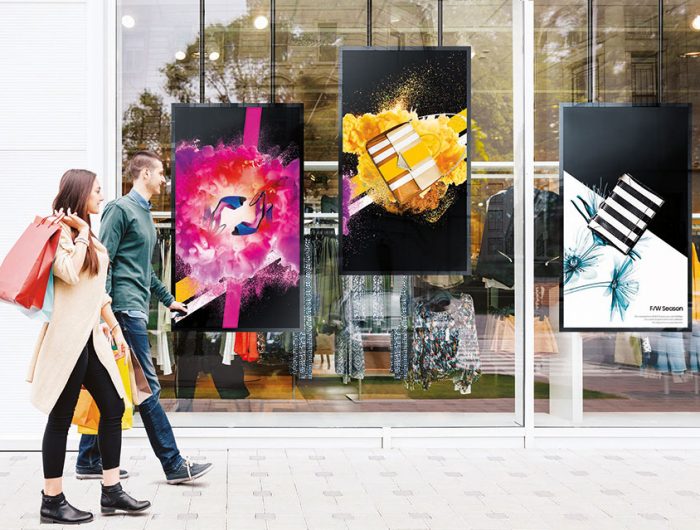
A screen that performs well inside a store may behave very differently when it faces the street through glass.
Brightness, mounting position, distance from the glazing, ventilation, content scale and service access should therefore be considered together before a display format is selected.
Review the window as part of the display system
The window should be reviewed as part of the display system.
Its orientation, glass type, tint, coatings, surrounding architecture and exposure to direct sunlight can all affect how the screen appears from outside.
A north-facing window may have different daylight conditions from a façade receiving strong afternoon sun.
Nearby buildings, canopies and street lighting can also influence visibility at different times of day.
The display specification should respond to those actual conditions rather than assuming every storefront requires the same brightness or screen format.
Account for reflections, glare and glazing
Storefront glass introduces another visual layer between the screen and the viewer.
Reflections from the street, sky, vehicles, neighbouring buildings and interior lighting can compete with the content being shown.
Glare may also change throughout the day as the sun moves across the façade.
These conditions should be reviewed when deciding screen position, brightness and content contrast.
Placing the display closer to the glazing can sometimes reduce unwanted reflections from the interior, but the correct setback depends on the installation, ventilation requirements and access needs.
Match the format to viewing conditions
Window displays may be seen by pedestrians standing close to the storefront, people walking past at an angle or vehicles viewing the display from farther away.
Those are very different viewing conditions.
Screen dimensions, orientation, text size and content density should be planned around the most important viewing positions.
Portrait displays can work well in narrow glazing bays, while landscape screens may suit wider storefront sections or content that needs more horizontal space.
The format should follow the window and viewing environment rather than forcing one orientation into every location.
Keep storefront content clear
Window content usually needs to communicate quickly and at a distance.
Text, prices, promotional graphics and product imagery should be large enough to remain readable from the intended viewing position.
Trying to place too much information on one screen can reduce clarity, especially when reflections or strong daylight are present.
Content should therefore be designed around the display dimensions and the actual external viewing conditions.
For broader campaign networks across several screens or locations, digital signage can provide the larger content-distribution context, while the window display remains one specific presentation point within that system.
Choose a display approach for the storefront
A storefront can use several different display approaches.
High-brightness commercial LCD displays may suit conventional window installations where a solid screen surface is acceptable.
LED systems can support larger or more customized formats.
Where preserving sightlines through the glazing is important, transparent LED displays may be worth considering because they can provide visual content while allowing more of the interior or façade behind the display to remain visible.
The appropriate option depends on the storefront architecture, viewing conditions, required visual scale and available mounting space.
No single technology should be assumed to suit every window.
VISUAL REFERENCES
Real display environments

Give the window a distinct communication role
The storefront is only one part of the customer-facing space.
Window displays may introduce a campaign or message before someone enters, while screens deeper inside the store can serve different communication roles.
Shelf-level displays, larger indoor displays and other retail formats operate at different viewing distances and stages of the environment.
In retail environments, these roles should be coordinated without assuming that every screen needs to show the same content in the same format.
The window display should be planned around what belongs at the storefront rather than duplicating every message used elsewhere.
Plan for heat and ventilation near glazing
Displays positioned close to windows can be affected by heat buildup.
Solar exposure, limited air movement and enclosed architectural details can increase the temperature around the equipment.
Ventilation and clearance requirements should therefore be considered before the screen is installed tightly against the glass or enclosed within joinery.
The selected display and mounting arrangement should allow appropriate airflow and access according to the equipment and site conditions.
Where active ventilation or more complex enclosure design is required, that requirement should be identified during technical coordination.
Coordinate mounting, power and cabling
Window displays need a stable mounting method that works with the storefront structure and finishes.
The screen may be wall-mounted, ceiling-supported, integrated into a frame or positioned on a freestanding support depending on the location.
Power, data and controller locations should also be considered early so that cables do not become visible across finished glazing or interior surfaces.
For more complex structures, large formats or constrained storefront conditions, an engineered display solution can define the display-related mounting, power, cabling and service-access requirements within the agreed project scope.
Plan installation around an operating storefront
Many window-display projects are added to existing stores rather than new construction.
Installation planning may therefore need to consider trading hours, customer access, merchandise, existing finishes and the need to keep parts of the storefront operational.
Access equipment, temporary protection and cable routing can also affect how the work is sequenced.
For multi-location rollouts, the general display concept can remain consistent while mounting details and screen dimensions adapt to the physical conditions of each branch.
Define software and source-system boundaries
A window screen can present pricing, promotional content, product imagery and campaign material, but the display itself should not automatically be treated as the system managing that information.
CMS platforms, scheduling tools, POS systems, inventory feeds, live pricing, analytics platforms, cameras, sensors and other third-party systems may require separate software, network and integration scope.
Those dependencies should be identified clearly if they form part of the project.
The display installation can then be planned around the actual connectivity and control requirements that have been defined.
Keep cleaning and service access practical
Storefront areas need regular cleaning and maintenance, and the display should not make that unnecessarily difficult.
Access to the screen, mounting hardware, power equipment and controllers should be considered from the beginning.
If the display is recessed or integrated into architectural elements, service access should be resolved before those finishes are completed.
Future screen or component replacement should also be possible without unnecessarily dismantling the surrounding storefront where the site conditions allow it.
NEXT STEP
Let us plan the right display system for your space.
If you are planning a digital window display for a retail store, showroom, restaurant, bank, real-estate office or other glazed storefront, Spectracolor can review the viewing conditions, glazing, screen format, mounting, ventilation and installation requirements with you before the system is finalized.
Talk to Spectracolor →