
DIGITAL KIOSKS
Digital kiosks for information, directories and interactive applications
Digital kiosks provide a dedicated screen position for information, directories and clearly defined interactive applications in public and commercial spaces.
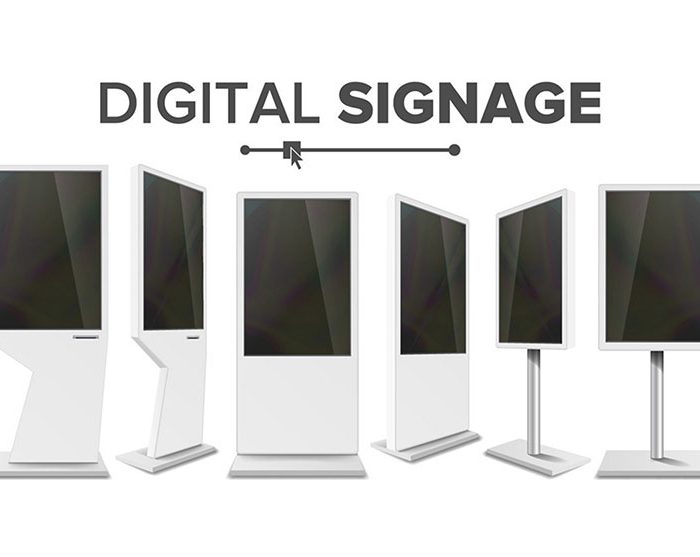
The right kiosk format depends on more than screen size. Touch requirements, enclosure design, mounting method, interaction height, viewing angle, ambient light, circulation, power, data and maintenance access all affect how the system should be planned.
Spectracolor approaches kiosk projects as display installations first, with the software, data sources and transactional functions defined separately according to the actual project scope.
Define the application before the enclosure
A kiosk should begin with a clear application.
Some projects need a simple information point. Others may require a directory, product exploration interface, wayfinding application, registration screen or another interactive workflow supplied as part of a wider system.
Those different uses can require different screen sizes, orientations, touch technologies, enclosures and peripheral provisions.
Defining the intended application early helps avoid designing the physical kiosk around assumptions that change later in the project.
Where the requirement is primarily non-interactive communication rather than user input, a broader digital signage solution may be more appropriate.
Choose a format that fits the space
Kiosks can be freestanding, wall-mounted or integrated into counters and furniture.
A freestanding unit may suit an open lobby or public circulation area, while wall-mounted or counter-mounted formats can work where floor space is limited.
Portrait and landscape orientations also affect how information is presented and how users approach the screen.
The physical format should therefore be selected around the space, the intended content and the way people are expected to interact with the display rather than choosing an enclosure first and fitting the application into it afterward.
VISUAL REFERENCES
Real display environments
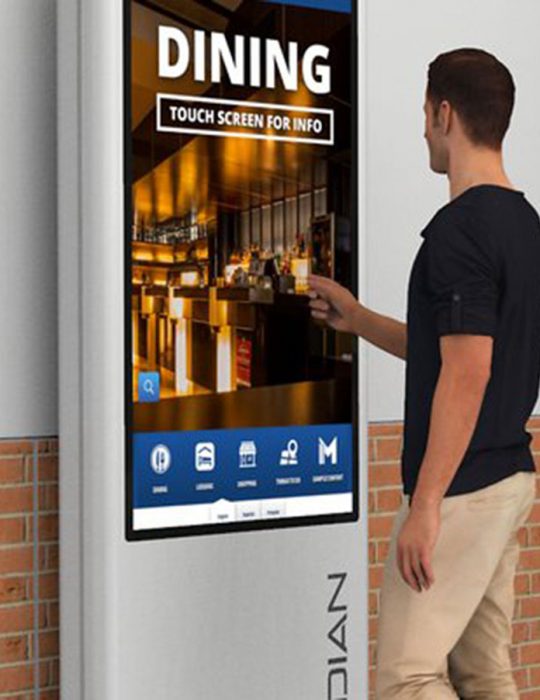
Position the screen for interaction
Interactive displays need to be positioned differently from screens that are viewed from a distance.
Screen height, viewing angle and reach should be considered together with surrounding circulation and the position from which a user is expected to operate the kiosk.
Reflections and ambient light can also affect both visibility and touch interaction, particularly near glazed entrances or strongly lit interiors.
Where accessibility requirements apply, the relevant dimensions, controls and application behavior should be reviewed against the project requirements rather than assumed from the display hardware alone.
Treat directories as a complete system
Kiosks are often used to present directories or wayfinding information, but the display is only one part of that system.
A digital building directory can provide a useful reference point for projects involving tenants, departments, destinations or building information.
If the kiosk depends on a live directory database, mapping platform, route calculation or another data source, those systems need to be identified separately.
The physical kiosk can then be planned around the application requirements, connectivity and service conditions that have actually been defined.
Separate hardware from software and transactions
Interactive hardware should not be confused with the software and services behind it.
Ordering, POS, payment processing, visitor management, check-in, reservations, ticketing, CRM, inventory, queue management and access control can all require separate applications, databases, integrations and commercial agreements.
Peripheral devices such as printers, scanners, card readers, cameras or payment terminals also introduce their own mounting, power, data and maintenance requirements.
If these functions are part of the project, they should be coordinated explicitly rather than presented as automatic capabilities of the kiosk display itself.
Coordinate the enclosure and service access
A kiosk enclosure needs to protect and support the display while also allowing installation and future maintenance.
Ventilation, cable routes, equipment space, access panels, mounting points and service clearances should all be considered before fabrication or installation.
The enclosure may also need to coordinate with surrounding finishes, branding, furniture or architectural elements.
For custom structures or more complex site conditions, an engineered display solution can define the mechanical, electrical and access requirements around the actual installation.
Confirm power, data and equipment access
Power and data requirements should be established before the kiosk location is finalized.
Cable routes need to reach the installation cleanly without creating exposed wiring or conflicting with surrounding finishes.
If the kiosk depends on network connectivity, cloud applications, local controllers or third-party systems, those requirements should be confirmed during coordination.
The screen and enclosure should also allow practical access to the equipment that may eventually need inspection, replacement or troubleshooting.
Plan installation in occupied spaces
Kiosks are often added to malls, hospitals, corporate buildings, showrooms, real-estate environments and other occupied spaces.
Installation therefore needs to consider flooring, wall finishes, nearby furniture, public circulation and available working hours.
A kiosk that looks simple after completion can still require careful coordination behind the enclosure, particularly when power and data were not originally planned at that location.
NEXT STEP
Let us plan the right display system for your space.
If you are planning a digital kiosk for information, directories or a defined interactive application, Spectracolor can review the display format, enclosure, mounting conditions, power, data and installation requirements with you before the system is finalized.
Talk to Spectracolor →