
PRODUCTS
LED screens and digital signage products for different applications
Display technology should be selected around the environment, audience, viewing distance, content and physical conditions of the project.
An indoor LED wall, outdoor screen, digital directory, kiosk or window display may all present digital content, but they are designed for different applications and operating conditions.
Spectracolor's product range covers LED displays, commercial digital displays and specialized signage formats for indoor, outdoor, interactive and architectural applications.
The right starting point is to identify what the display needs to communicate, where it will be installed and how people will interact with or view it.
Start with the environment
The installation environment quickly narrows the product choices.
Indoor spaces generally provide more controlled lighting and environmental conditions, while exterior installations may need to account for daylight, rain, dust, temperature changes and longer viewing distances.
Semi-exposed locations, glazed storefronts and architectural applications can sit between those categories and require more specific evaluation.
For close-view interior applications, indoor LED displays can support large-format visual surfaces with pixel pitch selected around viewing distance and content detail.
For exposed exterior locations, outdoor LED screens can be specified around daylight conditions, environmental exposure, mounting and service requirements.
The selected equipment should always be matched to the actual site rather than assuming one specification suits every indoor or outdoor location.
LED or commercial display technology
LED and commercial LCD displays solve different requirements.
LED can create large or customized display surfaces without the conventional panel dimensions associated with LCD screens. It can be useful where scale, modularity or architectural integration are important.
Commercial LCD displays can be appropriate for smaller-format signage, close viewing and applications where standard screen dimensions are sufficient.
Video-wall configurations can combine multiple commercial panels to form a larger indoor visual surface, although bezel layout, mounting and service access need to be considered.
The choice should be based on viewing conditions and application requirements rather than treating one technology as universally better.
VISUAL REFERENCES
Real display environments

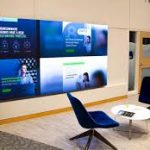
Digital signage for general communication
Digital signage is the broader category for screens used to present scheduled information, branding, promotions, guidance and other visual communication.
A digital signage project may consist of one screen or a larger network distributed across several areas or locations.
The display hardware is only one part of that environment.
Content-management platforms, scheduling systems, network infrastructure, data feeds and third-party integrations should be defined separately according to the project scope.
This distinction becomes especially important when several different display products are expected to work within the same communication system.
Kiosks for dedicated user interaction
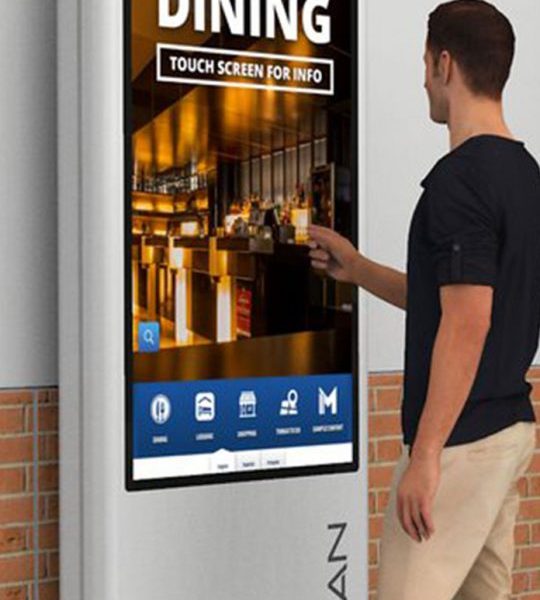
Digital kiosks place a display inside a dedicated enclosure or structure and can support information, directory and defined interactive applications.
They may be freestanding, wall-mounted or integrated into the surrounding interior.
Digital kiosks should be selected around screen size, mounting, enclosure design, accessibility, power, data and the specific interaction requirements of the project.
Touch capability does not automatically mean that software applications, booking systems, payment functions or external databases are included. Those systems require separately defined integration scope.
Building directories for tenant and destination information
Digital building directories are designed around structured information such as tenants, departments, floors, services and destinations.
They are particularly relevant in office buildings, commercial developments, healthcare environments, campuses and other multi-destination spaces.
The display format should be planned around listing density, readability, placement and how information will be updated.
Directory databases, visitor-management platforms and live tenant information remain separate systems unless specifically included in the project.
Menu boards for frequently changing offers
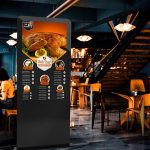
Digital menu boards provide a structured way to present menus, pricing, product categories and promotional content in food and beverage environments.
Screen dimensions and orientation should support the amount of information being displayed and the distance from which customers need to read it.
The physical display system can be coordinated with mounting, power and content-source requirements.
POS integration, live pricing, inventory feeds and menu-management platforms should be separately defined when required.
Shelf-edge displays for close-range communication
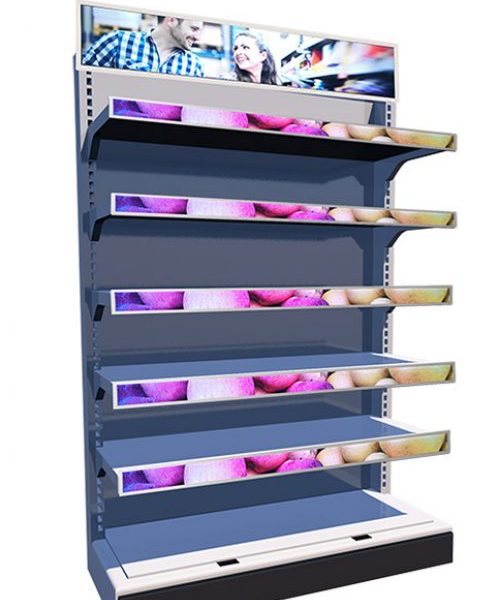
Digital shelf edge displays operate at a much shorter viewing distance than large signage screens.
They can present product information, pricing or campaign material directly at shelving and merchandising areas.
Because they sit close to products and customers, physical dimensions, mounting, cable routing and content density become particularly important.
Digital shelf edge displays should therefore be treated as a specific retail format rather than simply a smaller version of a conventional signage screen.
Lobby displays for arrival and reception areas
Digital lobby signage supports communication at entrances, receptions, waiting areas and other arrival points.
These displays may present branding, information, directories, announcements or visual content depending on the location.
Viewing distance, architectural integration, screen orientation and surrounding finishes should guide the selected format.
The lobby screen can also form part of a wider signage network while retaining a specific role at the point of arrival.
Window displays for storefront glazing
Digital window displays are planned specifically around glass-facing environments.
Daylight, glare, reflections, glass tint, viewing direction and the distance between the screen and glazing can all influence the result.
Some storefronts may suit high-brightness commercial displays, while others may require LED or another format.
Heat buildup, ventilation and service access should also be considered when equipment is positioned close to glazing.
Transparent displays where sightlines matter
Some installations need digital content without fully blocking visibility through glazing or architectural openings.
Transparent LED displays can be considered where maintaining sightlines is part of the design objective.
Transparency, viewing distance, content style, ambient light and the supporting structure all influence whether this technology is appropriate.
Transparent formats should therefore be selected because they solve a specific architectural requirement, not simply because transparency is available as a feature.
Media façades for architectural-scale applications
Media façades extend display technology into building exteriors and architectural surfaces.
These systems can involve larger viewing distances, façade integration, transparency requirements, exterior conditions and more complex mounting considerations.
Media façades should be planned together with the architecture and physical building conditions rather than approached as conventional screens enlarged to façade scale.
The display system also needs to account for installation access, maintenance and the relationship between the visual surface and the building behind it.
Compare products using practical criteria
Several factors help determine which product family is appropriate.
Viewing distance influences pixel pitch, screen dimensions and the level of content detail that can be presented clearly.
Ambient light affects brightness requirements.
Exterior exposure introduces environmental considerations.
Portrait or landscape orientation can influence how content fits within the available space.
Glazing may introduce reflections or create a requirement to preserve sightlines.
Interactive applications require different planning from passive presentation.
Screen dimensions also need to work with the available structure, mounting surface and service access.
These factors should be considered together rather than choosing a display based only on screen size or product category.
Plan the physical system around the selected product
Once the display direction is established, mounting, structure, power, data, ventilation and service access need to be coordinated with the site.
Large LED installations, architectural displays and constrained locations may require more detailed technical planning.
Engineered solutions can address display-related structural interfaces, electrical requirements, cabling, controller positions, ventilation and installation access within the defined project scope.
Software platforms, building infrastructure and third-party systems should remain clearly separated unless their integration is specifically included.
Choose the product direction first, then refine the specification
A useful product recommendation starts with basic project information:
- installation location
- indoor, outdoor or semi-exposed conditions
- available dimensions
- approximate viewing distance
- intended content
- ambient-light conditions
- preferred orientation
- interaction requirements
- mounting conditions
- available power and data
- installation and maintenance access
These details help narrow the choice from the full product range to the display format that best fits the application.
Once the product direction is clear, the individual product page and project-specific technical planning can provide the deeper specification needed for implementation.
NEXT STEP
Discuss your display requirements
If you are comparing LED screens, digital signage products or specialized display formats, Spectracolor can review the application, environment, dimensions, viewing conditions and installation requirements with you before a specific product direction is finalized.
Talk to Spectracolor →